Docs
Flink - The NextGen File and Text Sharing Platform




 </div>
🚀 Overview
Flink is a modern, secure, and responsive web application for sharing files and text snippets with others using simple 6-digit sharing codes. Built with cutting-edge technologies, Flink provides a seamless experience for uploading, sharing, and managing your files and texts with enterprise-grade security features.
✨ Key Features
- 🔐 Secure Authentication - Email/password authentication with Supabase Auth
- 📁 File Sharing - Upload and share files with automatic 6-digit code generation
- 📝 Rich Text Sharing - Share formatted text with full WYSIWYG editor support
- 🔒 Password Protection - Optional password protection for sensitive content
- ⏰ Expiration Control - Set custom expiration dates or never-expire options
- 📱 Responsive Design - Optimized for desktop, tablet, and mobile devices
- 🎨 Modern UI/UX - Clean, intuitive interface with smooth animations
- 🔍 Search & Filter - Easily find and manage your shared content
- 📊 Analytics - Track download counts and access statistics
- 🌐 Public Access - Share content without requiring recipients to sign up
🏗️ Architecture
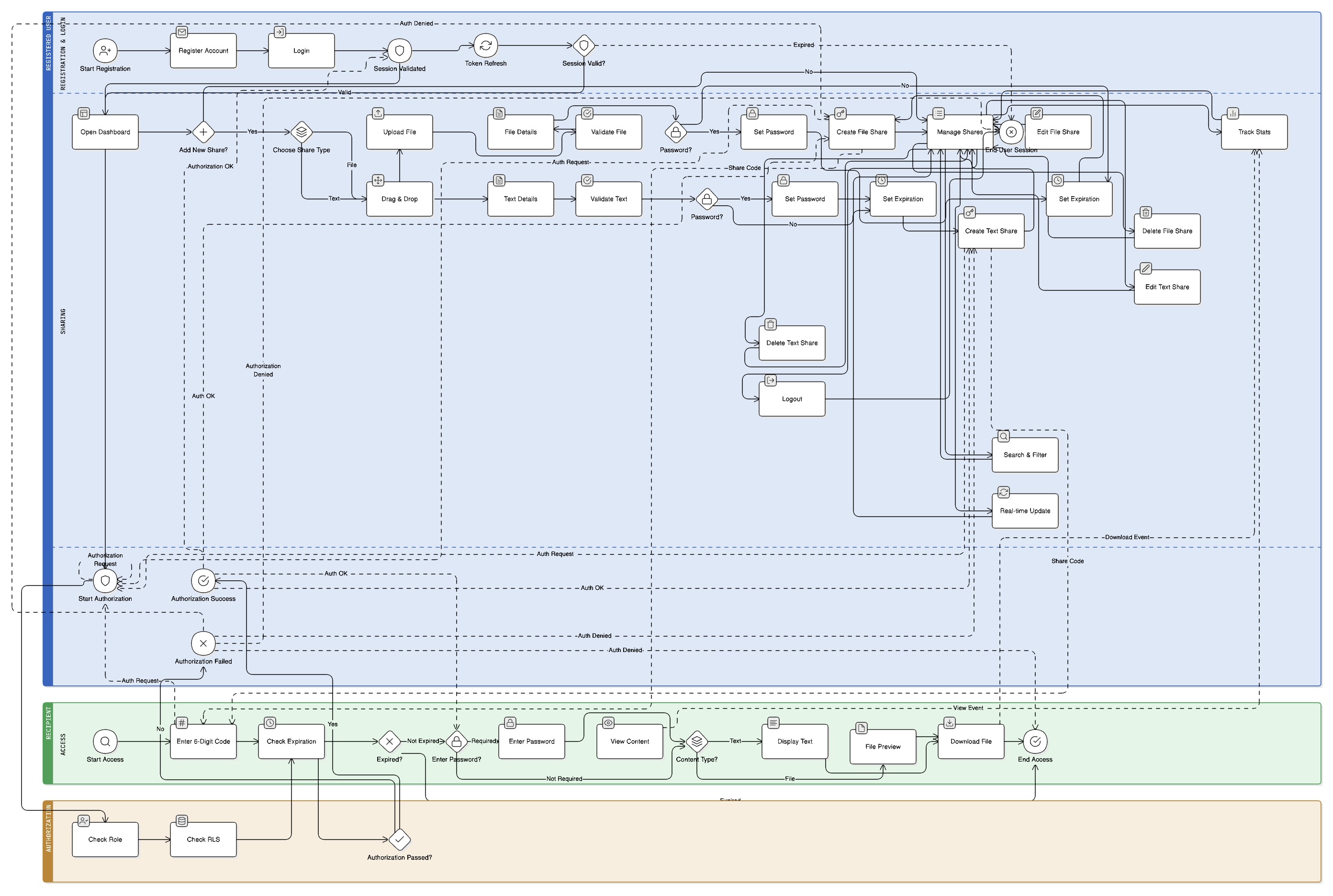
Technology Stack
| Category | Technology | Version | Purpose |
|---|---|---|---|
| Frontend | React | 18.3.1 | UI Framework |
| Language | TypeScript | 5.5.3 | Type Safety |
| Styling | Tailwind CSS | 3.4.0 | Utility-first CSS |
| Build Tool | Vite | 5.4.2 | Fast Development & Build |
| Backend | Supabase | Latest | Database, Auth, Storage |
| Routing | React Router | 6.22.3 | Client-side Routing |
| Animations | Framer Motion | 11.0.8 | Smooth Animations |
| Rich Text | React Quill | 2.0.0 | WYSIWYG Editor |
| Icons | Lucide React | 0.344.0 | Modern Icons |
Project Structure
flink/
├── public/                     # Static assets
├── src/
│   ├── components/            # Reusable UI components
│   │   ├── Auth/             # Authentication components
│   │   ├── Dashboard/        # Dashboard-specific components
│   │   └── Layout/           # Layout components
│   ├── contexts/             # React Context providers
│   │   ├── AuthContext.tsx   # Authentication state management
│   │   └── ShareContext.tsx  # Share data management
│   ├── lib/                  # Utility libraries
│   │   ├── supabase.ts       # Supabase client configuration
│   │   └── database.types.ts # TypeScript database types
│   ├── pages/                # Page components
│   │   ├── HomePage.tsx      # Landing page
│   │   ├── LoginPage.tsx     # User login
│   │   ├── RegisterPage.tsx  # User registration
│   │   ├── DashboardPage.tsx # User dashboard
│   │   ├── AccessPage.tsx    # Content access page
│   │   └── ShareTextPage.tsx # Full-page text editor
│   ├── App.tsx               # Main application component
│   ├── main.tsx              # Application entry point
│   └── index.css             # Global styles
├── supabase/
│   └── migrations/           # Database migration files
├── package.json              # Dependencies and scripts
├── tailwind.config.js        # Tailwind CSS configuration
├── vite.config.ts            # Vite configuration
└── README.md                 # This file
📊 Data Model
Database Schema
shares Table
The core table that stores all shared files and text content:
CREATE TABLE shares (
  id uuid PRIMARY KEY DEFAULT gen_random_uuid(),
  user_id uuid REFERENCES auth.users(id) ON DELETE CASCADE NOT NULL,
  type text NOT NULL CHECK (type IN ('file', 'text')),
  name text NOT NULL,
  title text,
  content text NOT NULL,
  file_type text,
  file_size bigint,
  access_code text NOT NULL UNIQUE,
  has_password boolean DEFAULT false,
  password_hash text,
  expires_at timestamptz,
  created_at timestamptz DEFAULT now(),
  download_count integer DEFAULT 0,
  file_path text
);
Field Descriptions
| Field | Type | Description |
|---|---|---|
id |
UUID | Primary key, auto-generated |
user_id |
UUID | Foreign key to auth.users |
type |
TEXT | Either ‘file’ or ‘text’ |
name |
TEXT | Original filename or text title |
title |
TEXT | Custom title (optional) |
content |
TEXT | File URL or rich text content |
file_type |
TEXT | MIME type for files |
file_size |
BIGINT | File size in bytes |
access_code |
TEXT | 6-digit unique access code |
has_password |
BOOLEAN | Password protection flag |
password_hash |
TEXT | SHA256 hashed password |
expires_at |
TIMESTAMPTZ | Expiration date (null = never) |
created_at |
TIMESTAMPTZ | Creation timestamp |
download_count |
INTEGER | Access/download counter |
file_path |
TEXT | Storage path for files |
TypeScript Interface
interface ShareItem {
  id: string;
  userId: string;
  type: 'file' | 'text';
  name: string;
  title?: string;
  content: string;
  fileType?: string;
  size?: number;
  accessCode: string;
  hasPassword: boolean;
  password?: string;
  expiresAt: string;
  createdAt: string;
  downloadCount: number;
  filePath?: string;
}
🔐 Security Features
Authentication
- Supabase Auth - Industry-standard authentication
- Email/Password - Secure credential-based login
- Session Management - Automatic token refresh and validation
- Protected Routes - Route-level authentication guards
Data Protection
- Row Level Security (RLS) - Database-level access control
- Password Hashing - SHA256 encryption for password-protected shares
- Secure File Storage - Supabase Storage with proper access policies
- Input Validation - Client and server-side validation
Access Control
- User Isolation - Users can only access their own shares
- Public Access - Controlled public access via access codes
- Expiration Management - Automatic content expiration
- Download Tracking - Monitor access patterns
🚀 Getting Started
Prerequisites
- Node.js (v18 or higher)
- npm or yarn
- Supabase Account (Create one here)
Installation
- Clone the repository
git clone https://github.com/SANIDHYADASH/flink.git cd flink - Install dependencies
npm install # or yarn install - Set up Supabase
- Create a new project at supabase.com
- Copy your project URL and anon key
- Run the migration scripts in your Supabase SQL editor
- Configure environment variables
cp .env.example .envUpdate
.envwith your Supabase credentials:VITE_SUPABASE_URL=your-supabase-url VITE_SUPABASE_ANON_KEY=your-supabase-anon-key -
Run database migrations
Execute the following SQL files in your Supabase SQL editor:
supabase/migrations/20250608144710_navy_feather.sqlsupabase/migrations/20250608144719_crimson_scene.sql
- Start the development server
npm run dev # or yarn dev -
Open your browser
Navigate to
http://localhost:5173
📋 Usage Guide
For Users
1. Registration & Login
- Create an account with email and password
- Login to access your personal dashboard
- Secure session management with automatic token refresh
2. Sharing Files
- Click “ADD NEW” → “Share File”
- Upload any file type (max 10MB)
- Add optional title and password protection
- Set expiration date or choose “Never Expire”
- Get a unique 6-digit access code
3. Sharing Text
- Click “ADD NEW” → “Share Text”
- Use the rich text editor with formatting options
- Add titles, headers, lists, code blocks, and more
- Set password protection and expiration
- Get a unique 6-digit access code
4. Managing Shares
- View all shares in a responsive dashboard
- Search and filter by title or content
- Edit existing shares (update content, settings)
- Delete shares with automatic cleanup
- Track download/access statistics
5. Accessing Shared Content
- Visit
/accessor use the “Access Content” link - Enter the 6-digit access code
- Provide password if required
- View or download the shared content
For Recipients
1. Accessing Content
- No account required
- Enter the 6-digit code provided by the sender
- Enter password if the content is protected
- View text content or download files
2. Content Display
- Text: Full-width rich text display with formatting
- Files: File preview with download button
- Security: Automatic expiration handling
🎨 Features Deep Dive
Rich Text Editor
- WYSIWYG Interface - What You See Is What You Get
- Formatting Options - Headers, fonts, colors, alignment
- Media Support - Images, videos, links
- Code Blocks - Syntax highlighting for code snippets
- Lists & Tables - Organized content structure
- Full-Page Mode - Distraction-free editing experience
File Management
- Drag & Drop Upload - Intuitive file selection
- File Type Support - All file types supported
- Size Limits - 10MB maximum file size
- Preview System - File information display
- Secure Storage - Supabase Storage integration
- Automatic Cleanup - Files deleted when shares expire
Access Control
- 6-Digit Codes - Easy to share and remember
- Password Protection - Additional security layer
- Expiration Options - 1, 3, 7, 14, 30 days, or never
- Download Tracking - Monitor access patterns
- Public Access - No recipient registration required
User Experience
- Responsive Design - Works on all devices
- Dark/Light Themes - Comfortable viewing
- Smooth Animations - Framer Motion integration
- Keyboard Shortcuts - Power user features
- Search & Filter - Quick content discovery
- Real-time Updates - Live data synchronization
🔧 Configuration
Environment Variables
| Variable | Description | Required |
|---|---|---|
VITE_SUPABASE_URL |
Your Supabase project URL | Yes |
VITE_SUPABASE_ANON_KEY |
Your Supabase anonymous key | Yes |
Tailwind Configuration
The application uses a custom Tailwind configuration with:
- Custom Color Palette - Primary, secondary, accent colors
- Extended Spacing - 8px grid system
- Custom Animations - Fade-in, slide-up effects
- Typography Scale - Consistent font sizing
- Component Classes - Reusable UI components
Supabase Configuration
Storage Bucket
- Bucket Name:
shares - Public Access: Enabled for file downloads
- RLS Policies: User-specific upload/delete permissions
Database Policies
- User Isolation: Users can only access their own shares
- Public Read: Access codes allow public content viewing
- Secure Updates: Download count updates with proper validation
🚀 Deployment
Build for Production
npm run build
# or
yarn build
Deployment Options
Vercel (Recommended)
- Connect your GitHub repository
- Set environment variables in Vercel dashboard
- Deploy automatically on push
Netlify
- Build the project locally
- Upload
distfolder to Netlify - Configure environment variables
Other Platforms
- Firebase Hosting
- AWS S3 + CloudFront
- GitHub Pages
- Surge.sh
Environment Setup
Ensure your production environment has:
- Correct Supabase URL and keys
- HTTPS enabled (required for Supabase)
- Proper CORS configuration
🧪 Development
Available Scripts
| Script | Description |
|---|---|
npm run dev |
Start development server |
npm run build |
Build for production |
npm run preview |
Preview production build |
npm run lint |
Run ESLint |
Development Workflow
- Feature Development
- Create feature branch
- Implement changes
- Test thoroughly
- Submit pull request
- Code Quality
- TypeScript for type safety
- ESLint for code quality
- Prettier for formatting
- Component-based architecture
- Testing Strategy
- Manual testing in development
- Cross-browser compatibility
- Mobile responsiveness
- Security validation
Contributing Guidelines
- Fork the repository
- Create a feature branch
git checkout -b feature/amazing-feature - Commit your changes
git commit -m 'Add amazing feature' - Push to the branch
git push origin feature/amazing-feature - Open a Pull Request
🔍 API Reference
ShareContext Methods
createTextShare(text, name, expiresInDays, password?)
Creates a new text share with rich formatting.
Parameters:
text(string): Rich HTML contentname(string): Share titleexpiresInDays(number): Expiration in days (-1 for never)password(string, optional): Protection password
Returns: Promise<ShareItem>
createFileShare(file, expiresInDays, password?, title?)
Creates a new file share with upload to storage.
Parameters:
file(File): File object to uploadexpiresInDays(number): Expiration in days (-1 for never)password(string, optional): Protection passwordtitle(string, optional): Custom title
Returns: Promise<ShareItem>
getShareByCode(code)
Retrieves a share by its access code.
Parameters:
code(string): 6-digit access code
Returns: Promise<ShareItem | null>
updateShare(id, updatedData)
Updates an existing share.
Parameters:
id(string): Share IDupdatedData(Partial): Updated fields
Returns: Promise<ShareItem>
deleteShare(id)
Deletes a share and associated files.
Parameters:
id(string): Share ID
Returns: Promise<void>
🐛 Troubleshooting
Common Issues
1. Supabase Connection Error
Error: Missing Supabase environment variables
Solution: Ensure .env file has correct VITE_SUPABASE_URL and VITE_SUPABASE_ANON_KEY
2. File Upload Fails
Error: Failed to upload file
Solutions:
- Check file size (max 10MB)
- Verify storage bucket permissions
- Ensure user is authenticated
3. Access Code Not Working
Error: Invalid code or content has expired
Solutions:
- Verify code is exactly 6 digits
- Check if content has expired
- Ensure share exists in database
4. Rich Text Editor Issues
Error: Quill editor not loading
Solutions:
- Clear browser cache
- Check for JavaScript errors
- Verify React Quill installation
Debug Mode
Enable debug logging by adding to your .env:
VITE_DEBUG=true
Performance Optimization
- Image Optimization
- Use WebP format when possible
- Implement lazy loading
- Optimize file sizes
- Code Splitting
- Lazy load pages
- Split vendor bundles
- Use dynamic imports
- Caching Strategy
- Browser caching for static assets
- Service worker for offline support
- CDN for global distribution
📈 Roadmap
Version 2.0 (Planned)
- Team Collaboration - Shared workspaces
- Advanced Analytics - Detailed usage statistics
- API Access - RESTful API for integrations
- Mobile Apps - Native iOS and Android apps
- Advanced Security - Two-factor authentication
- Custom Domains - Branded sharing links
- Bulk Operations - Mass upload and management
- Integration Hub - Third-party service connections
Version 2.1 (Future)
- Real-time Collaboration - Live editing
- Version Control - Content versioning
- Advanced Permissions - Granular access control
- Audit Logs - Comprehensive activity tracking
- Enterprise Features - SSO, compliance tools
- AI Integration - Smart content suggestions
- Blockchain Storage - Decentralized file storage
🤝 Contributing
We welcome contributions from the community! Here’s how you can help:
Ways to Contribute
- 🐛 Bug Reports - Report issues and bugs
- 💡 Feature Requests - Suggest new features
- 📝 Documentation - Improve documentation
- 🔧 Code Contributions - Submit pull requests
- 🎨 Design - UI/UX improvements
- 🧪 Testing - Help with testing and QA
Development Setup
- Fork the repository
- Clone your fork
- Install dependencies
- Set up Supabase
- Start development server
- Make your changes
- Submit a pull request
Code Standards
- TypeScript - Use TypeScript for all new code
- ESLint - Follow the existing linting rules
- Components - Create reusable, well-documented components
- Testing - Add tests for new features
- Documentation - Update documentation for changes
📄 License
This project is licensed under the MIT License - see the LICENSE file for details.
MIT License

Copyright (c) 2024 Flink

Permission is hereby granted, free of charge, to any person obtaining a copy
of this software and associated documentation files (the "Software"), to deal
in the Software without restriction, including without limitation the rights
to use, copy, modify, merge, publish, distribute, sublicense, and/or sell
copies of the Software, and to permit persons to whom the Software is
furnished to do so, subject to the following conditions:

The above copyright notice and this permission notice shall be included in all
copies or substantial portions of the Software.

THE SOFTWARE IS PROVIDED "AS IS", WITHOUT WARRANTY OF ANY KIND, EXPRESS OR
IMPLIED, INCLUDING BUT NOT LIMITED TO THE WARRANTIES OF MERCHANTABILITY,
FITNESS FOR A PARTICULAR PURPOSE AND NONINFRINGEMENT. IN NO EVENT SHALL THE
AUTHORS OR COPYRIGHT HOLDERS BE LIABLE FOR ANY CLAIM, DAMAGES OR OTHER
LIABILITY, WHETHER IN AN ACTION OF CONTRACT, TORT OR OTHERWISE, ARISING FROM,
OUT OF OR IN CONNECTION WITH THE SOFTWARE OR THE USE OR OTHER DEALINGS IN THE
SOFTWARE.
📞 Support
Getting Help
- 📧 Email: sanidhyadash32@gmail.com
- 📖 Documentation: share.sanidhya.in/docs
- 🐛 Issues: GitHub Issues
Community
- 🌟 Star the repo if you find it useful
🙏 Acknowledgments
Built With Love Using
- React Team - For the amazing React framework
- Supabase Team - For the incredible backend-as-a-service
- Tailwind CSS - For the utility-first CSS framework
- Vite Team - For the lightning-fast build tool
- Open Source Community - For all the amazing libraries
Special Thanks
- Contributors - Everyone who has contributed to this project
- Beta Testers - Users who helped test and improve the app
- Design Inspiration - Modern web design communities
- Security Advisors - Security experts who reviewed our implementation
Made with ❤️ by Sanidhya
Website • Documentation • GitHub •
**⭐ Star us on GitHub if you find Flink useful!**